
How to take real estate photos with an iPhone: the settings that matter
By Ferit Patefe Coremagna, Founder and CEO, Miravely. Last checked
To take real estate photos with an iPhone, turn on the grid and level, hold the phone level and horizontal at about chest height, shoot each room from a doorway or a corner with every light on, and use the 0.5x Ultra Wide lens only for rooms too small for the main camera. Set the camera to save JPEG, lock the exposure before you shoot, and leave AI to fix exposure and color afterwards, never walls, windows or damage.
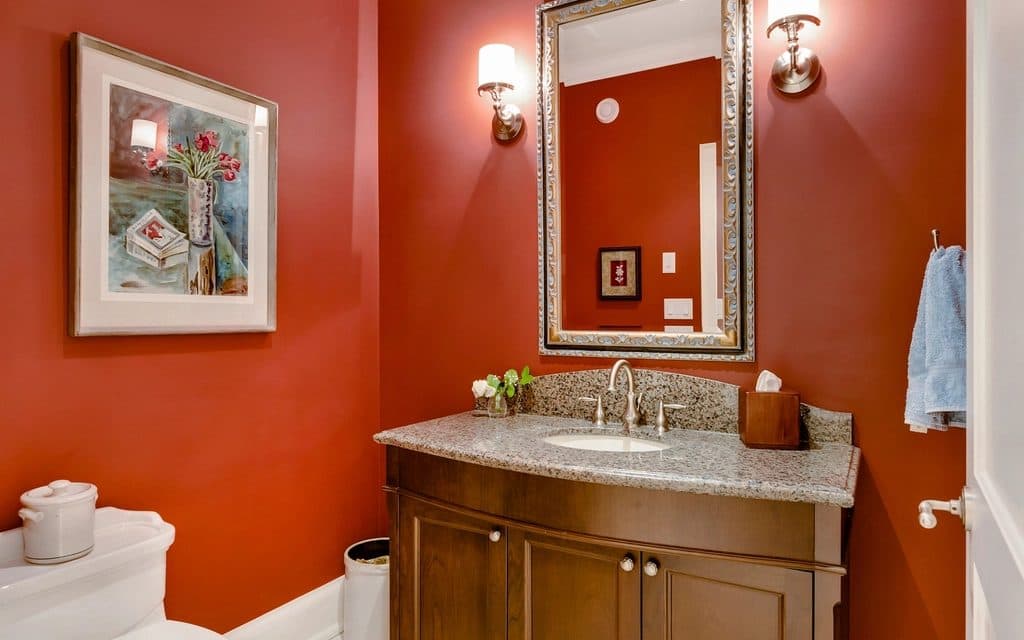 Unedited photo
On this page
The iPhone camera settings to change before the shoot
Turn on the grid and the level. In Settings, tap Camera, then turn on Grid and Level. The grid gives you lines to square the room against, and the level tells you when the phone is straight. Apple iPhone User Guide, “Use iPhone camera tools to set up your shot”
Save JPEG, not HEIC. Under Settings, Camera, Formats, choose Most Compatible, and every new photo is saved as a JPEG. Apple describes JPEG as the more broadly compatible format, and SmartMLS tells agents to make the same switch. Apple Support, “Using HEIF or HEVC media on Apple devices”
Leave the resolution alone. Newer iPhones save 24 megapixels from the main camera by default, more than twice the 2048 pixels wide an MLS such as Canopy stores. Lens Correction, which corrects the Ultra Wide camera’s distortion for more natural-looking results, is on by default and should stay on. Apple iPhone User Guide, “Change advanced camera settings on iPhone”
Skip ProRAW unless you edit every photo yourself. A ProRAW file is about 25MB at 12 megapixels and 75MB at 48, ten to twelve times a JPEG, which is past most MLS file limits until it is exported again. Apple Support, “About Apple ProRAW”
Grid and Level
On
Settings, Camera, then Grid and Level.
Apple iPhone User Guide, “Use iPhone camera tools to set up your shot”
Format
Most Compatible
Settings, Camera, Formats. Every new photo saves as a JPEG.
Lens Correction
On
On by default. It corrects the Ultra Wide camera’s distortion.
Apple iPhone User Guide, “Change advanced camera settings on iPhone”
When to use the 0.5x Ultra Wide lens, and when not to
The 0.5x button switches to the Ultra Wide camera, which on the iPhone 17 is a 13 mm equivalent lens with a 120-degree field of view. The main camera is 26 mm. Apple, iPhone 17 technical specifications
13 mm is past the point where a wide lens starts to lie. HomeJab, a real estate photography marketplace, puts it at about 14 mm on a full-frame camera: below that, straight lines start to curve and furniture near the edges looks stretched. HomeJab, "How to Avoid Over-Exaggerating Spaces with Ultra-Wide Lenses"
That is a legal question as well as a look. UK trading standards guidance for estate agents says not to “use extreme lenses that affect the perspective of the image”, and a room that looks much bigger online than it does at the viewing is exactly what that guidance is about. Business Companion, "Property descriptions: sale or let"
Use 0.5x for small rooms the main camera cannot fit, such as a bathroom, a hall or a box room, and shoot everything else on 1x from a doorway or a corner. If a room still does not fit, step back through the door rather than going wider.
Keep the phone level, or the walls lean
Tilt the phone up to get the ceiling in, and every vertical line in the room leans toward the top of the frame. Tilt it down and they lean the other way. Door frames, window edges and the corners of walls are where a buyer sees it first.
Hold the phone upright at about chest height, check the level before each shot, and if you need more of the floor or the ceiling, move rather than tilt: step back, or crop the photo afterwards. Apple iPhone User Guide, “Use iPhone camera tools to set up your shot”
Shoot landscape. Several MLSs ask for horizontal photos outright, and systems that store photos at 4:3 turn a portrait photo into a narrow strip between two bars. MLS Now, “Listing Photo Rules and Requirements”
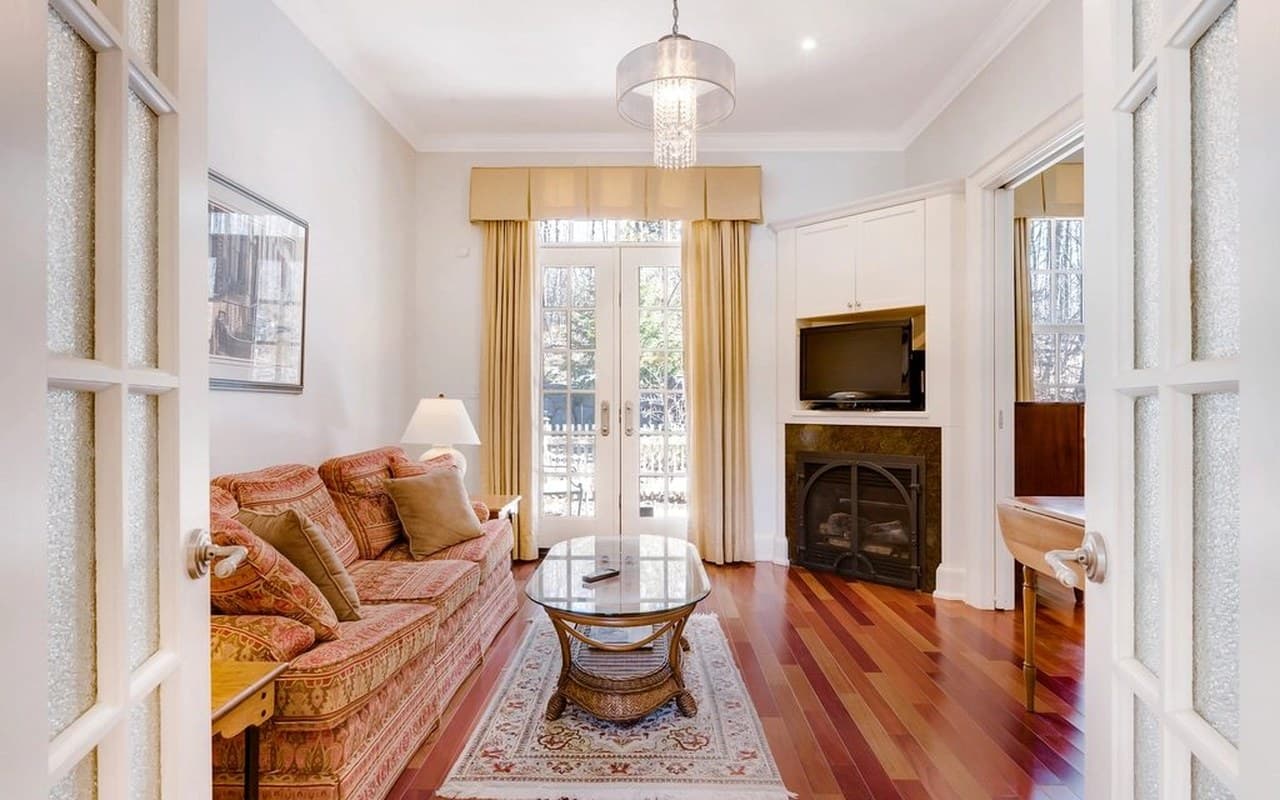 Unedited photo
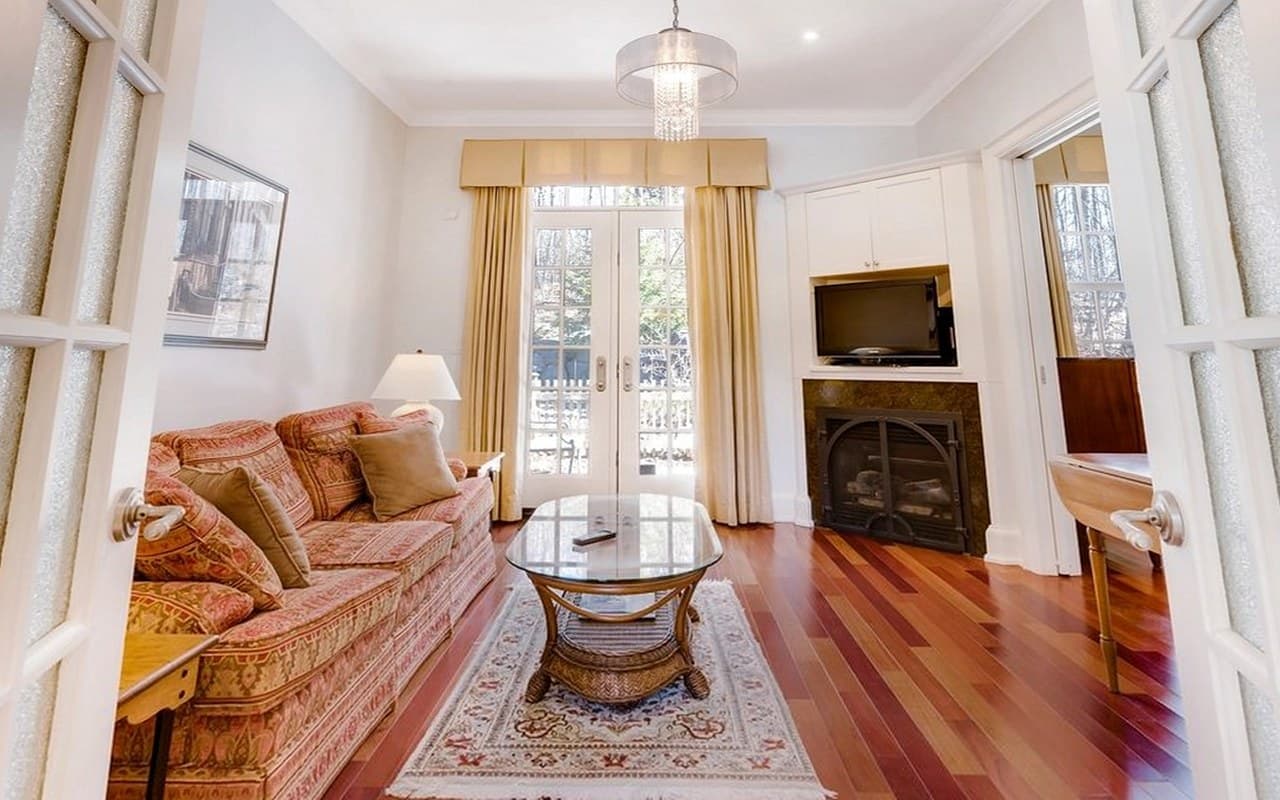 Tilt simulated
Light: every lamp on, exposure locked
Turn on every light, open every blind, and shoot interiors when the sun is out. NWMLS’s own photography guide says interiors are best on a sunny day and, when that is not possible, to turn the lights on, open the blinds and bring extra light. NWMLS, “Real Estate Photography 101”
Then lock the exposure. Touch and hold the brightest part of the scene you want to keep, usually the window, until AE/AF Lock appears, and drag the exposure control to brighten or darken the room. The lock holds until you tap the screen again. Apple iPhone User Guide, “Use iPhone camera tools to set up your shot”
Watch for direct sun. A patch of sunlight on the floor is brighter than anything else in the room, and the camera has to choose between losing the patch to white and losing the room to shadow.
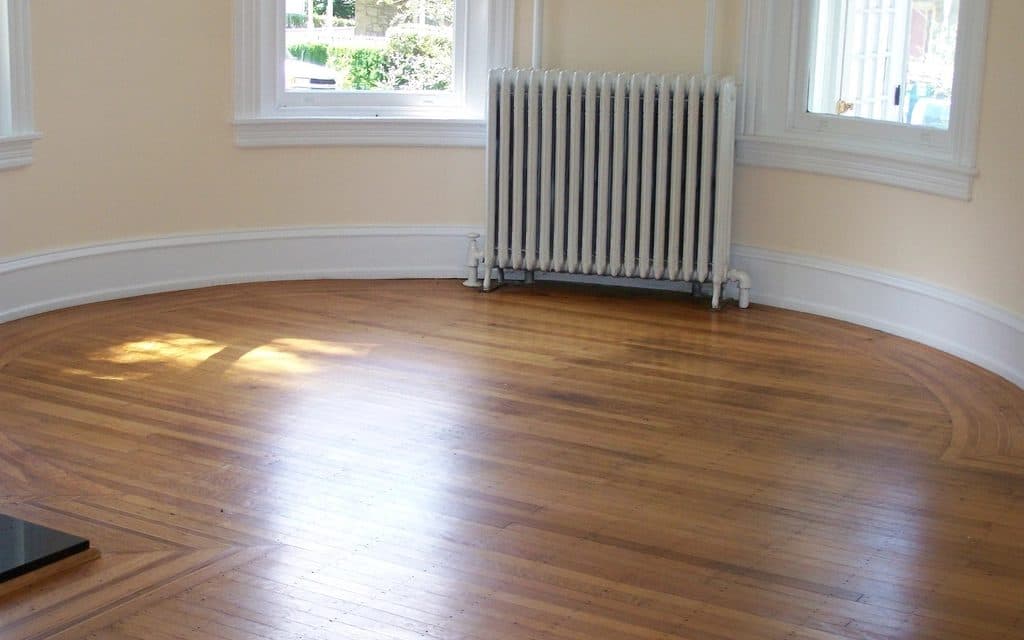 Unedited photo
Which shots to take, and how many
Start with the photos buyers look for first: the front of the house, the kitchen, the living room, the primary bedroom and the main bathroom. NWMLS names those five as the must-haves. NWMLS, “Real Estate Photography 101”
Aim for 20 to 30 photos, one or two per room or feature, and skip tiny rooms that do not photograph well, such as closets and utility rooms. Show every bedroom and bathroom the listing claims, because a missing one makes buyers wonder why. NWMLS, “Real Estate Photography 101”
Check every mirror and window for yourself before you shoot. NWMLS allows no people or pets in listing photos, including the photographer’s reflection. NWMLS, “Real Estate Photography 101”
What AI can fix in a phone photo, and what it must not
Some fixes change how a photo looks and nothing about the property. Rightmove calls them Light Touch Edits, “minimal editing such as cropping, brightness/contrast adjustments, colour balance, shadow lifting and warming tones.” A dark phone photo lifted by software is one of those. Rightmove Agent and Developer Technical Guidelines, January 2026
Others change the property, and those need a label at the least and are banned outright in some places. Bright MLS forbids editing out power lines, water towers or nearby roads. Bright MLS image policy
Doorify MLS goes further and lists changing wall colors or flooring, removing fixtures and improving the landscaping among the edits it does not permit at all. Doorify MLS, “Data Integrity: Media Guidelines”
The rule that covers every market: software may fix the light and the camera’s mistakes. It may not remove damage, move a wall, invent a view or hide something a buyer would want to know about. NAR, "Using AI to Enhance Listing Photos Can Be Legally Risky"
Before you shoot a listing on an iPhone
- Turn on Grid and Level, and set Formats to Most Compatible so photos save as JPEG. Apple Support, “Using HEIF or HEVC media on Apple devices”
- Clean the lens, and charge the phone and free some storage.
- Turn on every light and open every blind, and plan the shoot for a bright day. NWMLS, “Real Estate Photography 101”
- Shoot landscape, level, at about chest height, from doorways and corners. MLS Now, “Listing Photo Rules and Requirements”
- Use 0.5x only for rooms too small for 1x, and step back before you go wider. HomeJab, "How to Avoid Over-Exaggerating Spaces with Ultra-Wide Lenses"
- Lock exposure on the window before each interior shot. Apple iPhone User Guide, “Use iPhone camera tools to set up your shot”
- Check every mirror and window for your own reflection. NWMLS, “Real Estate Photography 101”
- Take 20 to 30 keepers: exterior, kitchen, living room, primary bedroom and main bathroom first. NWMLS, “Real Estate Photography 101”
Common questions
Can you take real estate photos with an iPhone?
Yes, and many agents do. A recent iPhone has the resolution and the wide lens a listing needs; what makes the difference is holding it level, lighting the room and choosing the lens with care. NWMLS still recommends a tripod and, if you can, a professional camera.
NWMLS, “Real Estate Photography 101”Should you use 0.5 for real estate photos?
Only in small rooms. The 0.5x Ultra Wide camera is a 13 mm equivalent lens, past the point where straight lines start to curve and furniture near the edges stretches, so it makes larger rooms look bigger than they are.
Apple, iPhone 17 technical specificationsWhat are the best iPhone camera settings for real estate photos?
Grid and Level on, Formats set to Most Compatible so photos save as JPEG, Lens Correction left on, and the exposure locked on the brightest part of the room before each shot.
Apple iPhone User Guide, “Use iPhone camera tools to set up your shot”Should real estate photos be HEIC or JPEG?
JPEG. Apple describes it as the more broadly compatible format, and SmartMLS tells agents to switch their iPhones to JPG. On the iPhone that is Settings, Camera, Formats, Most Compatible.
Apple Support, “Using HEIF or HEVC media on Apple devices”Should I shoot real estate photos in ProRAW?
Only if you edit every photo yourself. ProRAW files run about 25MB at 12 megapixels and 75MB at 48, ten to twelve times a JPEG, and have to be exported before most MLSs will take them.
Apple Support, “About Apple ProRAW”What height should you take real estate photos from?
About chest height, with the phone level. Much higher and the room looks down on its furniture, much lower and you tilt up to fit the ceiling in, which makes the walls lean.
Do you need a tripod for iPhone real estate photos?
It helps. A tripod keeps the phone level and at the same height from room to room, and NWMLS lists one among the accessories that lift phone photos.
NWMLS, “Real Estate Photography 101”How many photos should a listing have?
Usually 20 to 30, one or two per room or feature. NWMLS allows 40 but suggests that range, and Rightmove says never to launch a listing with fewer than five.
NWMLS, “Real Estate Photography 101”Miravely’s structure lock lets AI lift the light and clear the clutter in a phone photo while holding the walls, windows and doors exactly where your iPhone put them.