Skip to content

For listings

Furnish an empty property in about thirty seconds.

Empty rooms photograph badly and sell slowly. Stage them from the listing photographs you already have, without hiring furniture or a stylist.
Virtual staging for property listings: empty and stagedEmptyStaged
Drag to compare. This is a real result, not an illustration.

Step by step

How to virtually stage an empty room

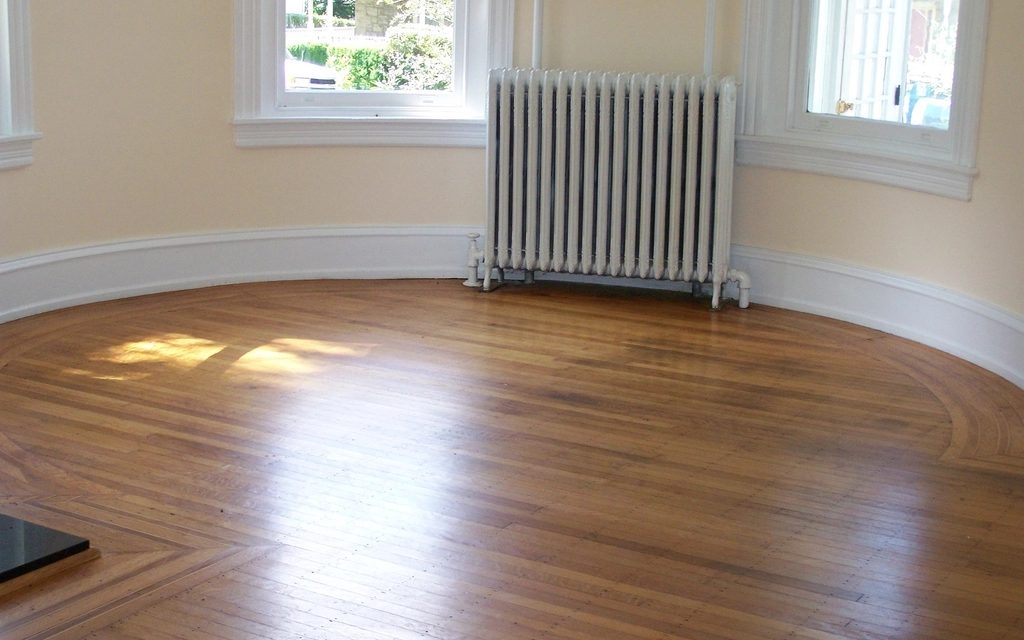
  1. The photo that went into this example of virtual stagingEmpty
    Step 1

    Drop in your photo

    A photograph of an empty room.

  2. Step 2

    Say what the room is, then pick the style

    Two picks. The room decides what furniture belongs in it, the style decides how it looks. The example used Living room and Scandinavian.
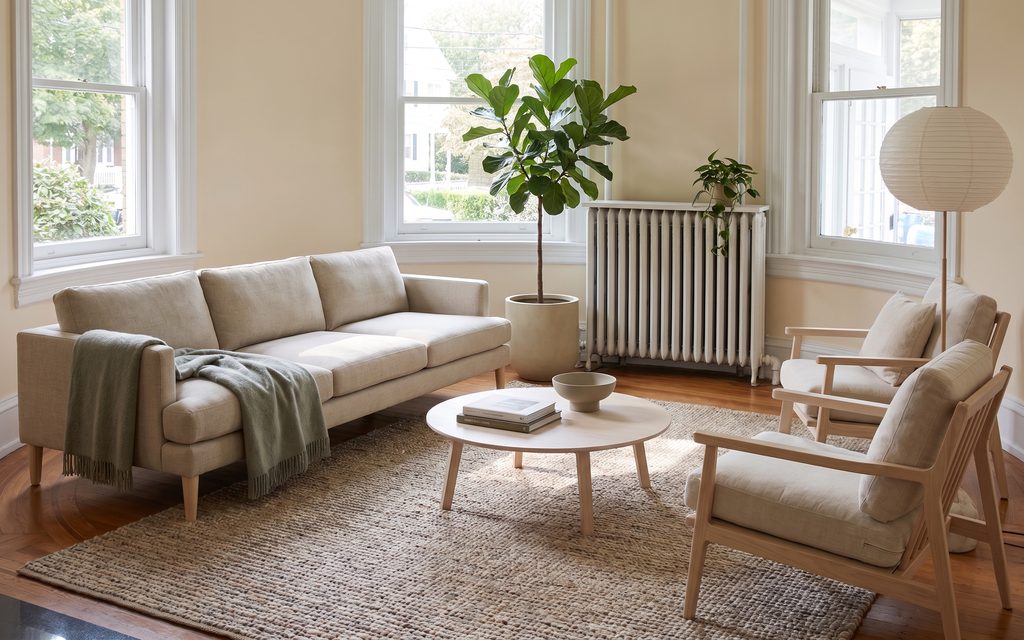
  3. What came back: the same photo after virtual stagingStaged
    Step 3

    Compare it, then use it

    The same room, furnished, with the architecture untouched.

Every picture here is this page’s own example: the file that was uploaded, the setting that was used, and the result exactly as it came back. Nothing was retouched afterwards.

Try it now

Drop in a photo and Miravely opens straight into virtual staging, no preset picking. About 30 seconds.

Drop in a photo

JPEG, PNG or WebP, up to 40 MB.

Or a sample

Settings

What you can change, and what each choice costs

Settings

From 12 credits

Engine
5 to choose from: GPT Image 2.5 (recommended), Nano Banana Pro, Nano Banana 2, Grok Imagine 2.0, GPT Image 1.5.
Quality
1K · 12 cr2K · 20 cr4K · 32 crOn GPT Image 2.5. Bigger is sharper and dearer, and it is the same edit either way.
Shape
Follows whatever you upload
Photos in
One. JPEG, PNG or WebP, up to 40 MB.

This one changes what is physically in the property. Listing rules in the US and the UK expect that to be disclosed, so the studio writes that line onto the image when you download it. You can turn it off there.

This list comes out of the studio itself rather than being typed onto the page, so these are the engines you will be offered and the price you will be charged for each quality.

Nothing is generated until you press the button, and the cost is shown before that, never after. A new account starts with 72 free credits to try it with, and a generation that fails is refunded.

See what a credit costs

The room stays the room

A buyer who walks in should recognise the space from the listing. Staging that invents an extra window is a complaint waiting to happen.

A reminder built in

Staging changes what is physically in the room. Before you generate, Miravely reminds you to label the image as digitally altered wherever you publish it -- which is what most portals and codes of practice now expect.

A whole property at once

Upload the full set of listing photographs and stage them in one consistent style rather than room by room.

Questions

Specific to virtual staging.

Will it add a window or move a wall to make the room look bigger?

No -- Miravely’s virtual staging only adds furniture. The room’s own openings and dimensions are held, so a buyer who walks in recognises the space from the listing.

Do I have to disclose that a listing is virtually staged?

Yes -- most portals and codes of practice now expect it. Miravely reminds you of this before you generate a staged image; labelling it as digitally altered wherever you publish it is on you, the same as any other listing claim.

Further reading

Virtual staging vs real staging: is virtual staging worth it?Virtual staging is worth it for a vacant home as long as it only adds furniture at the room’s real scale, is labeled, and is shown next to the empty photo, while real staging, at a median $1,500 in NAR’s 2025 survey, is worth it when buyers will judge the home in person and the furniture has to work at the viewing too.17 primary sources, linkedHow much does virtual staging cost in 2026? Prices from 12 providersVirtual staging costs about $16 to $37 a photo from a service where a designer does the work, and from well under $1 to about $3 a photo from an AI tool on a monthly plan.18 primary sources, linkedHow to stage an empty house without furniture, room by roomTo stage an empty house without furniture, spend on the three rooms buyers care about most, the living room, the primary bedroom and the kitchen, and bring in only a few pieces for each: a rug with two chairs and a lamp in the living room, a made-up bed in the bedroom, and clear counters with one or two accessories in the kitchen.7 primary sources, linkedHome staging statistics 2026: what the data actually showsThe most reliable home staging statistics come from NAR’s 2025 Profile of Home Staging: 83% of buyers’ agents said staging makes it easier for buyers to picture a home as theirs, 29% of agents saw offers rise by 1% to 10%, and a staging service cost a median of $1,500.9 primary sources, linkedWhy do real estate photos look fake? Seven tells buyers noticeReal estate photos usually look fake for one of three reasons: an ultra-wide lens that stretches the room, heavy HDR editing that flattens the light and leaves halos around the windows, or AI edits such as virtual staging, a replaced sky or a repainted lawn.15 primary sources, linkedZillow Showcase in 2026: what it costs, what it includes and whether it is worth itZillow Showcase costs $300 to $750 a listing at retail, on a six to twelve month contract with at least one listing a month, and the photos, 3D tour and interactive floor plan it requires are paid for separately unless your own photographer can produce them.10 primary sources, linked

Related

Start with the room you are standing in.

72 free credits, enough for a couple of photos or one short clip. No card needed.