
AI virtual staging tested: which tools move the windows?
By Ferit Patefe Coremagna, Founder and CEO, Miravely. Last checked
We gave six AI image tools the same three empty rooms and asked each to leave the room as it was, and four of them still changed a fixed part of one: Seedream redrew a living room, Nano Banana Pro rebuilt a bay window, Grok pulled the camera back by about a quarter and OpenAI’s GPT Image model added a shelf to a brick fireplace. Only Nano Banana 2, the Gemini app’s image model, and Miravely, which publishes this blog, kept every window, door and fireplace in place in all three rooms, and all six tools stood furniture against an open bedroom door.
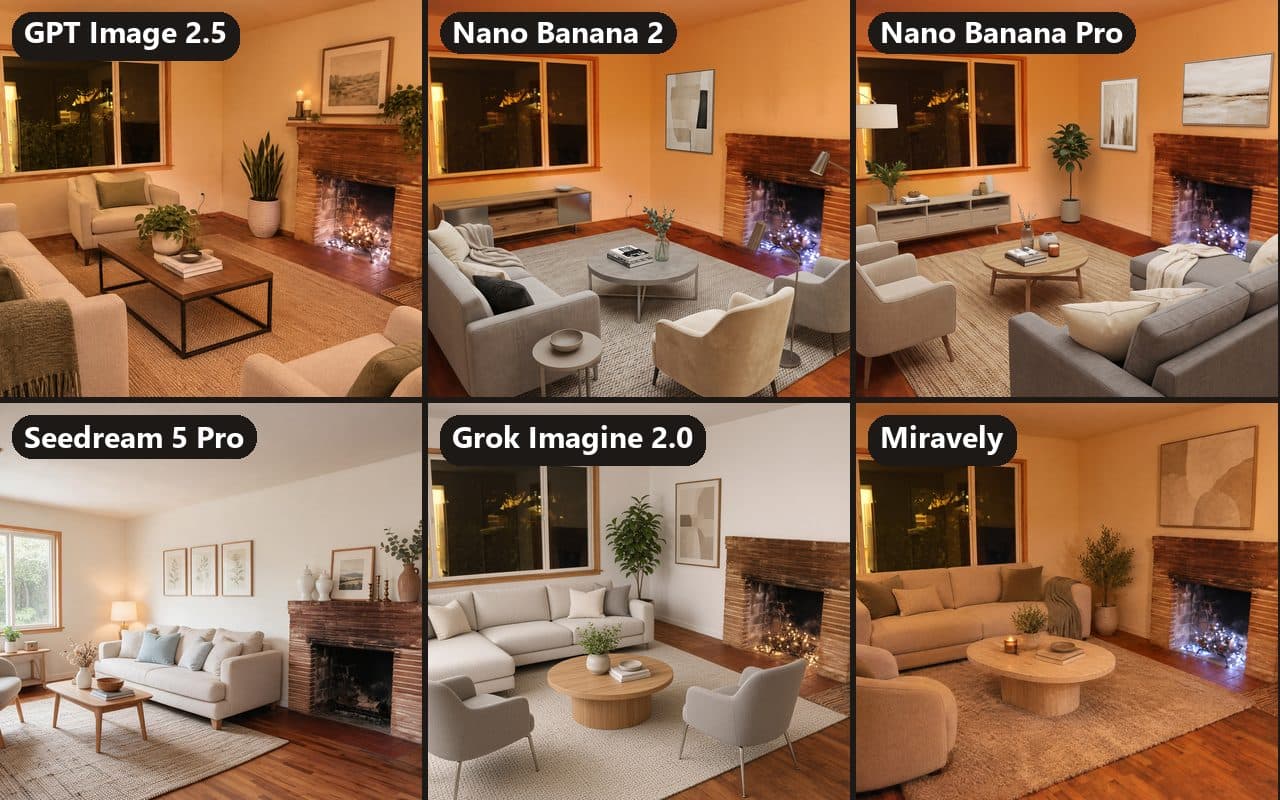 AI-generated
On this page
How we tested the AI staging tools
We took three empty rooms from one house, photographed at night by the same photographer and released into the public domain: a living room with a brick fireplace, a dining room with a bay window and a bedroom with an open door. Each tool got each photo once, with the same instruction.
“Virtually stage this empty living room for a real estate listing with modern, neutral furniture. Keep the room exactly as photographed: do not change or move the walls, windows, doors, floor, ceiling, light fixtures or outlets, and keep the same camera angle and framing.” For the other two rooms, only the name of the room changed.
We tested the models, not the ChatGPT and Gemini apps. Every image was made through an API on September 29, 2026, in a 3:2 frame and at 2K where the model offers it, with no retries and no picking the best of several. Miravely got its own staging template instead of the prompt above, because that is what a customer’s photo goes through.
Then we checked each result against its empty photo at the same size. Fourteen points per room that should not move, such as window and door corners, outlets, switches, a floor vent and the fireplace, were looked for in every result, and a match over the whole frame showed whether the camera had moved. We also compared every pair by eye, because a point hidden behind a sofa and a point that moved look the same to a script.
Rooms
3
A living room, a dining room and a bedroom from one empty house, photographed at night.
Tools
6
Five image models given the same prompt, and Miravely’s own staging template.
Fixed points
42
Fourteen per room: window and door corners, outlets, switches, a vent and the fireplace.
Which AI staging tools kept the room as it was
Two tools returned all three rooms with the camera, every window and door and the fireplace unchanged: Nano Banana 2 and Miravely. The other four each changed one room: a fireplace, a window, a whole room or the camera.
Where a tool kept the camera, the fixed points left in view sat a median of 7 pixels or less from where they started, on an image 2,048 pixels wide, which is too little to see. The failures were never a matter of a few pixels: a window or a fireplace was drawn again, or the camera moved.
One attempt per room is a small sample. Run the same prompt again and a tool that kept a room may not keep it the second time, which is why every result needs checking, whichever tool made it.
Rooms returned with the camera, windows, doors and fireplace unchanged, out of three
GPT Image 2.5
2 of 3Nano Banana 2
3 of 3Nano Banana Pro
2 of 3Seedream 5 Pro
2 of 3Grok Imagine 2.0
2 of 3Miravely
3 of 3
What each AI staging tool did to the rooms
The empty photo on the left and each tool’s result on the right, cut to the same frame, so anything that moved shows. Each tool is shown on the room where it changed the most.
GPT Image 2.5: a shelf on the fireplace
OpenAI’s current image model, run in its Sunburst version, which OpenAI says offers “an extra level of precision for detailed creative work.” It kept the camera exactly where it was in all three rooms, and the dining room and the bedroom came back with their structure unchanged. OpenAI, “Introducing ChatGPT Images 2.5”, September 8, 2026
In the living room it added a wooden mantel shelf across the top of the brick fireplace, with candles and a trailing plant on it. The prompt said not to change the fireplace, and a buyer who books a viewing will find no shelf.
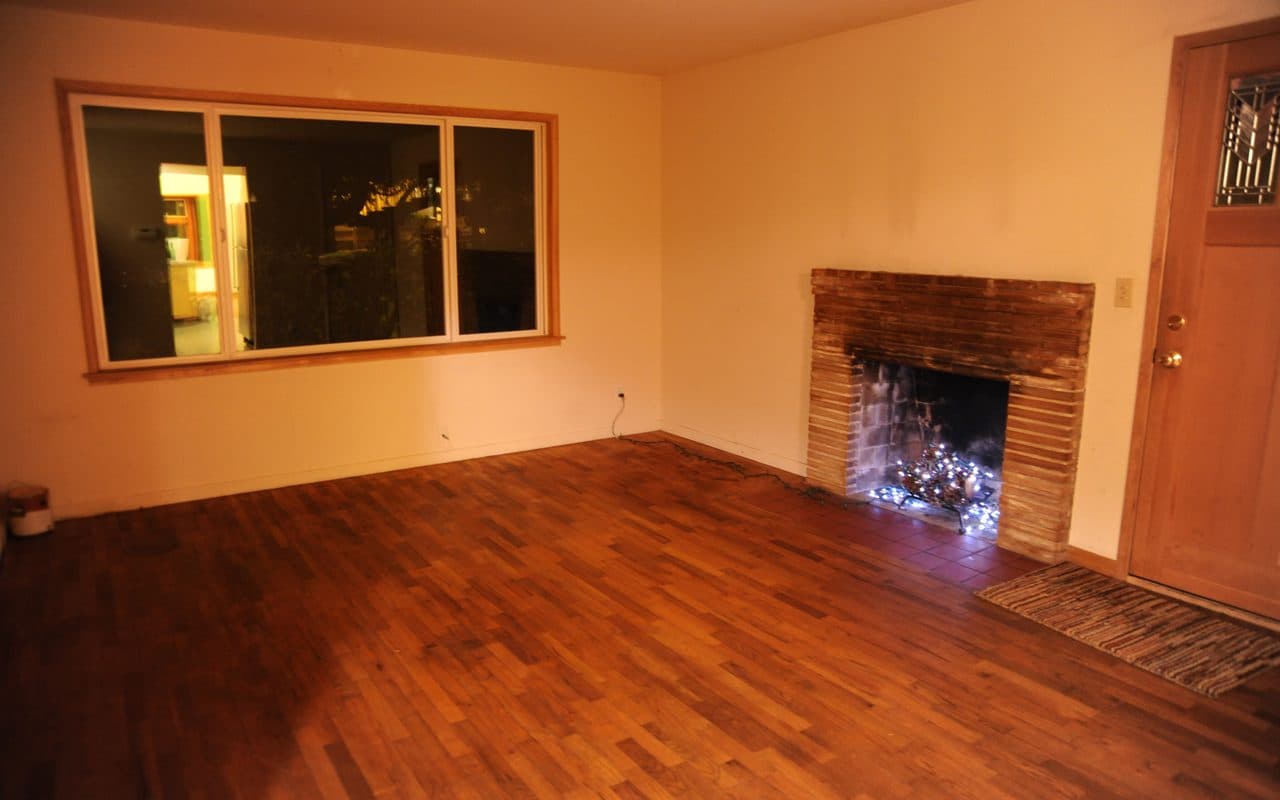 Unedited photo
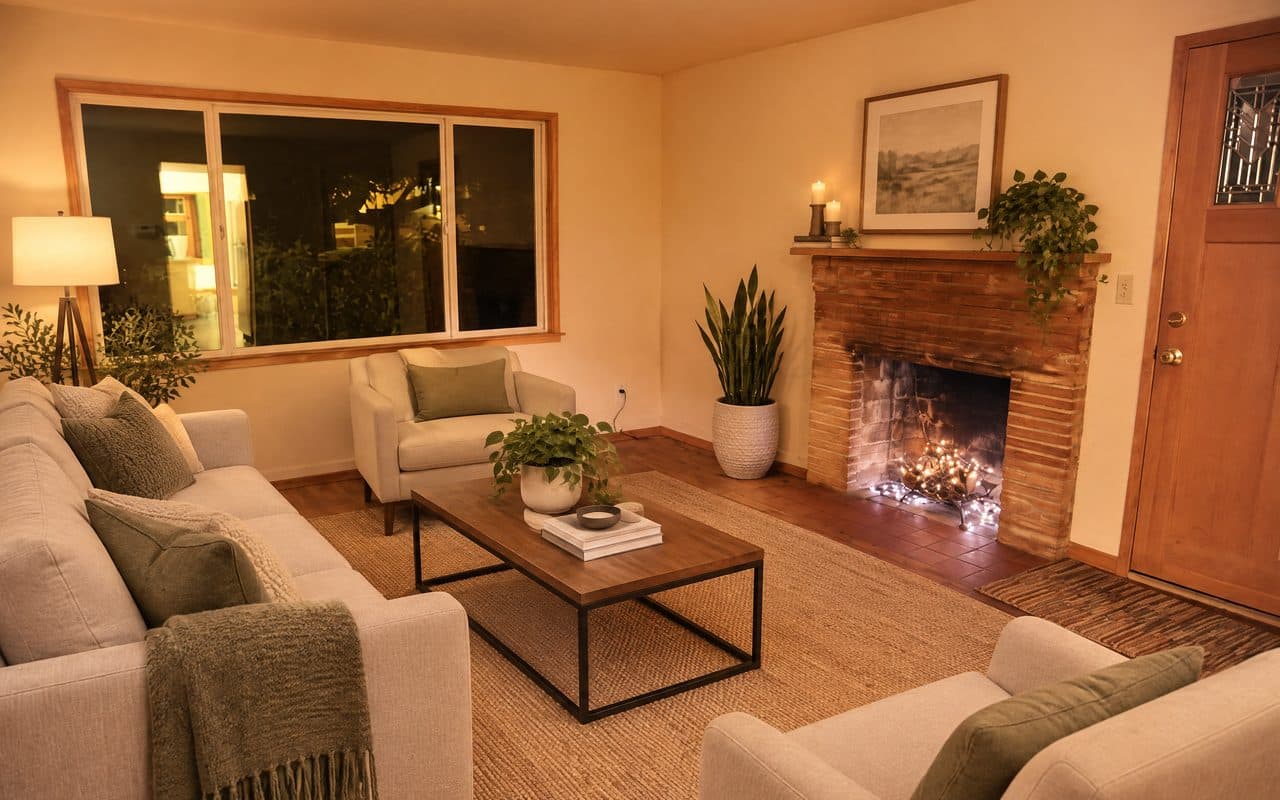 AI-staged, GPT Image 2.5
Nano Banana 2: the room kept, a curtain added
Google’s image model, which replaced Nano Banana Pro in the Gemini app in February 2026. It returned all three rooms with the camera, every window and door and the fireplace where they were. Google Workspace Updates, “Introducing Nano Banana 2 in the Gemini app”, February 26, 2026
It still added one thing to the room itself: in the dining room it hung a curtain on a new rod across part of the bay window. That is decor rather than structure, but it is not in the house, and in the living room it stood an armchair and a floor lamp in front of the fireplace.
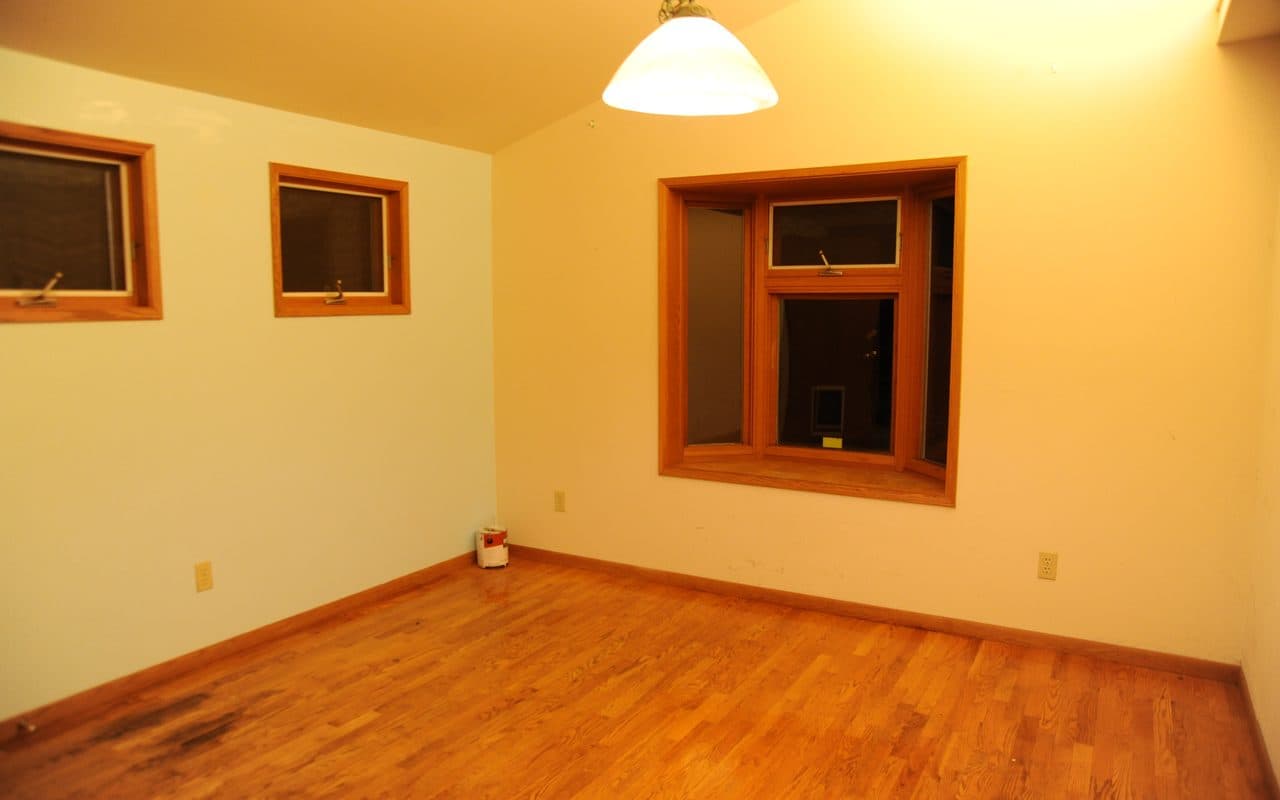 Unedited photo
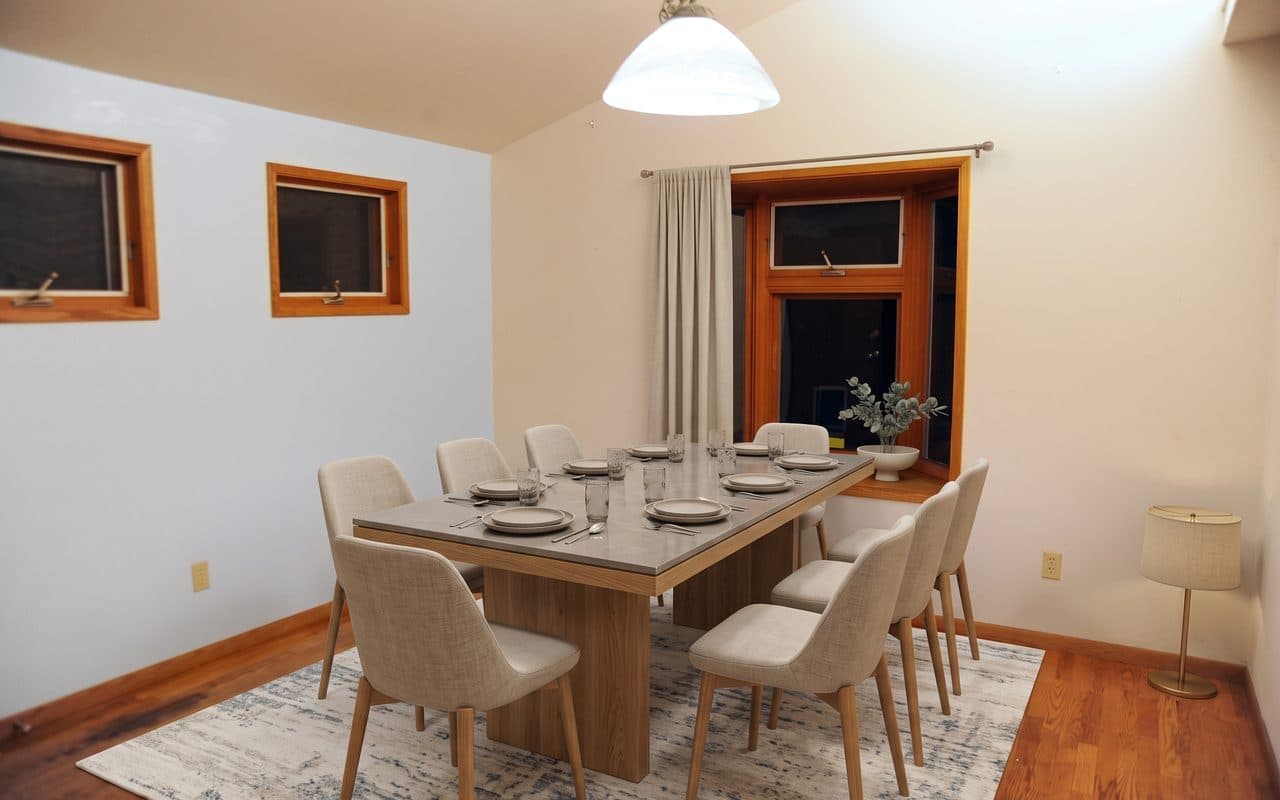 AI-staged, Nano Banana 2
Nano Banana Pro: a new bay window
Google’s higher-end image model, which Nano Banana 2 replaced as the Gemini app’s default. It drew the dining room again: the bay window came back bigger and lower, with a cushioned window seat the room does not have, daylight outside instead of night and a neighbor’s house in the glass. Google Workspace Updates, “Introducing Nano Banana 2 in the Gemini app”, February 26, 2026
The two small windows on the left moved and grew, and the outlets moved with them. The living room and the bedroom kept their structure, though in the living room a sofa runs across the front of the fireplace.
Unedited photo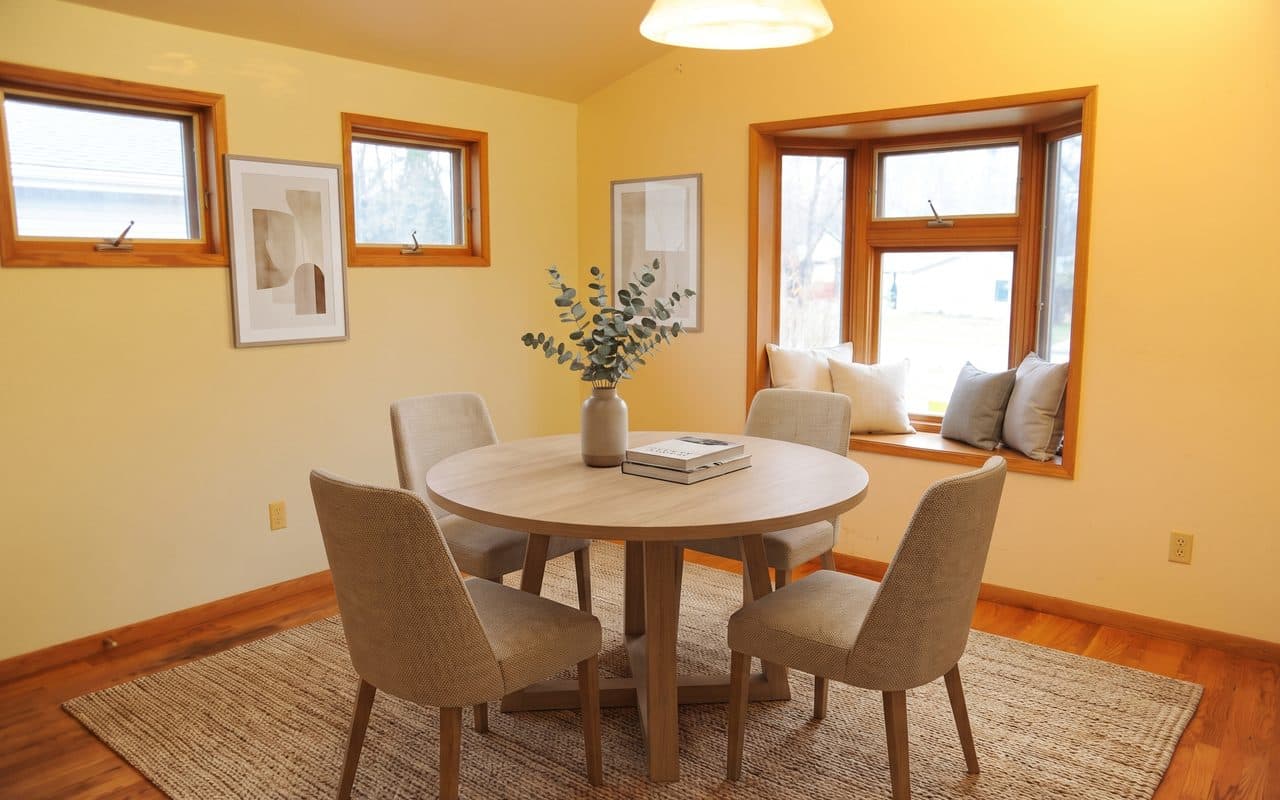 AI-staged, Nano Banana Pro
Seedream 5 Pro: a different living room
ByteDance’s model returned a different living room. The night window became a smaller one full of daylight and trees, the fireplace was rebuilt with a mantel and an empty grate, the walls turned white, two ceiling lights appeared and the camera moved. Of the 14 fixed points we checked, one could still be found.
The dining room and the bedroom kept their structure. In the dining room it stood a sideboard and a framed picture in the bay window.
Unedited photo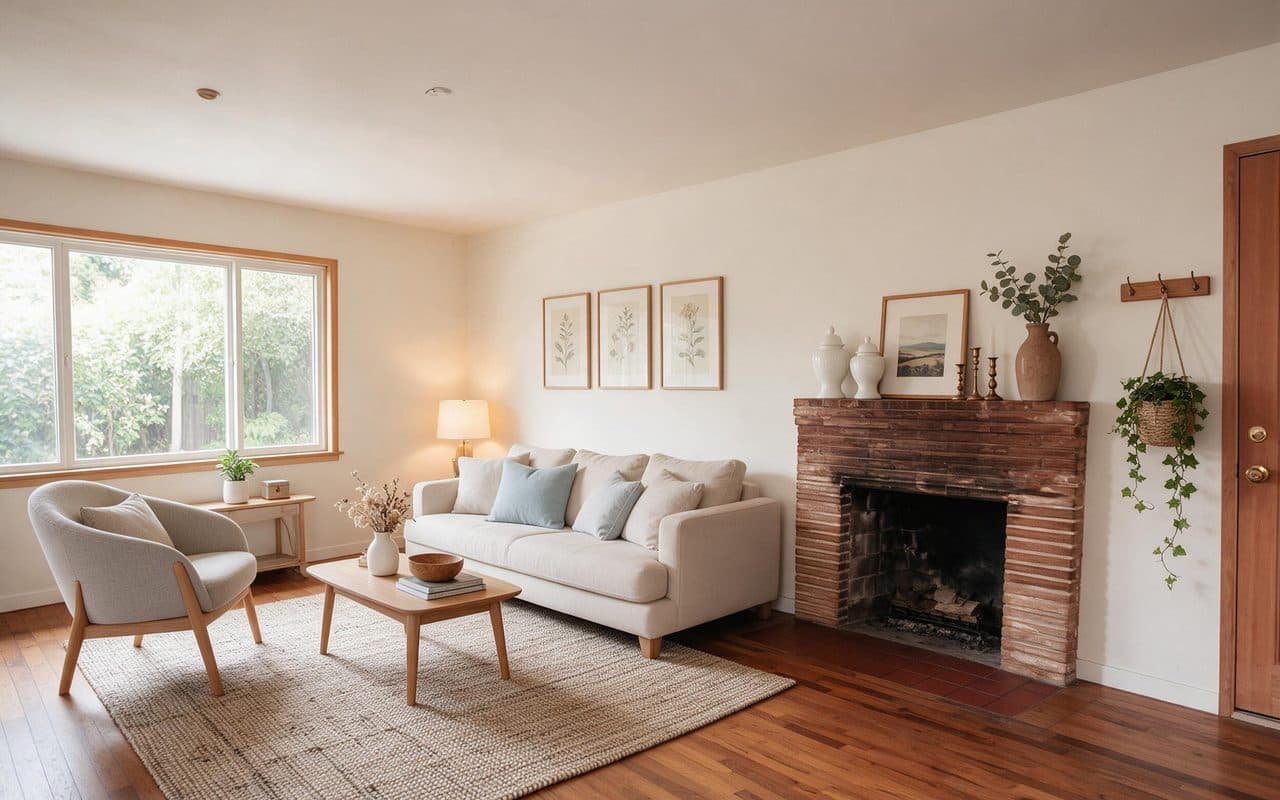 AI-staged, Seedream 5 Pro
Grok Imagine 2.0: the camera pulled back
xAI’s model kept the living room and the dining room in place, though it turned their warm walls white. In the bedroom it pulled the camera back: the photo’s whole frame fills only about three quarters of the width of Grok’s picture, and the floor, wall and ceiling around it were invented.
A wider view than the camera took makes a room look bigger than it is. Grok also returned the smallest images of the six, 1,728 pixels wide.
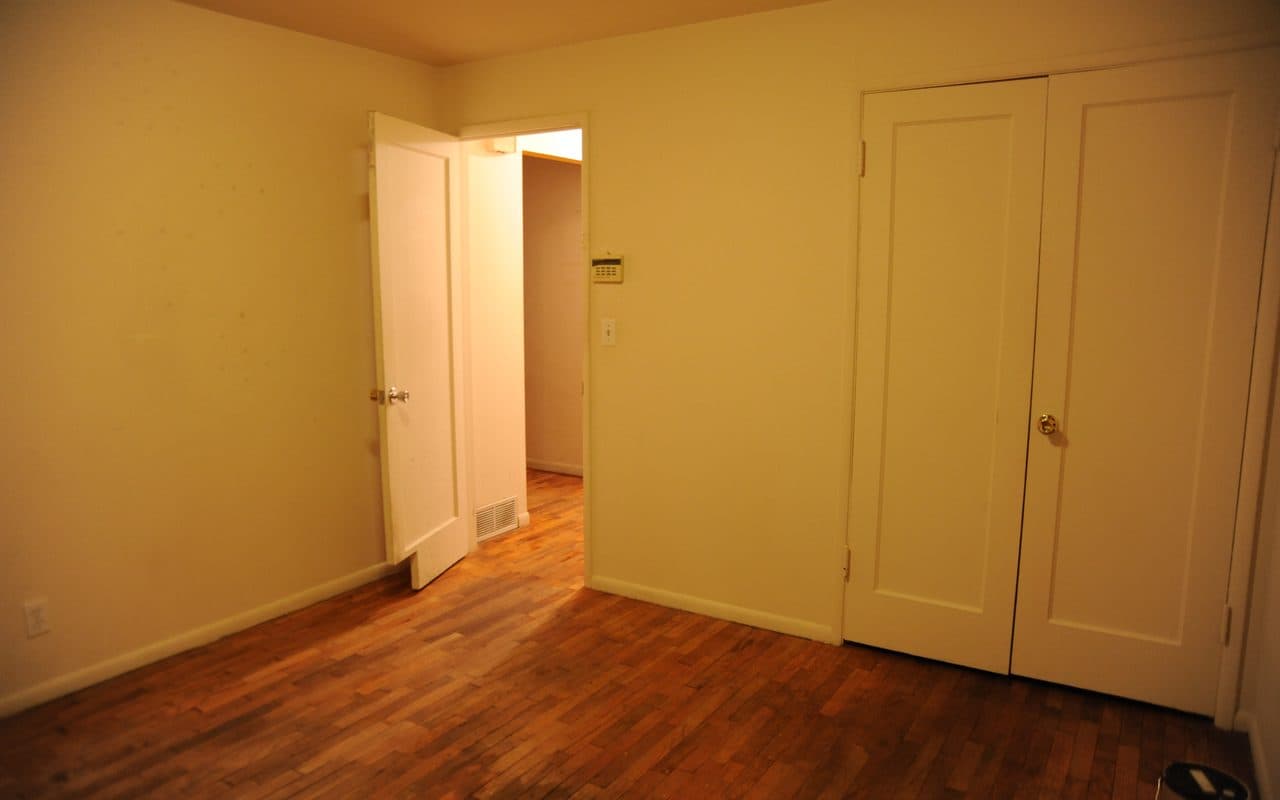 Unedited photo
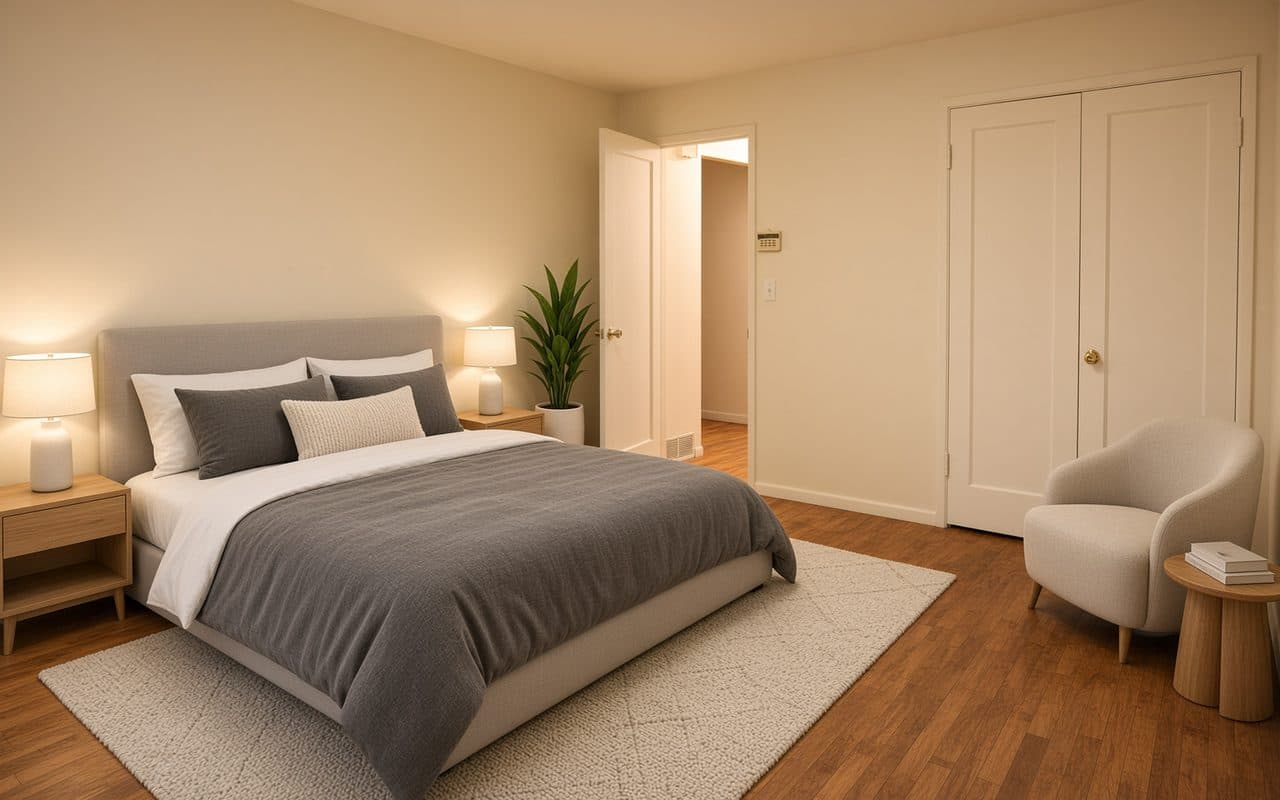 AI-staged, Grok Imagine 2.0
Miravely: the room kept, the window partly covered
Miravely, which publishes this blog, runs GPT Image 2.5 too, with its own staging instruction in place of our plain prompt. It kept all three rooms, and in each the fixed points it left in view sat a median of 1.4 pixels from where they started.
Its instruction also says “do not block any window,” and in the living room the back of the sofa still rises over the bottom of the window. In this test the same model with a longer instruction changed nothing fixed, which suggests the instruction matters as much as the model, though one attempt per room is too few to prove it.
Unedited photo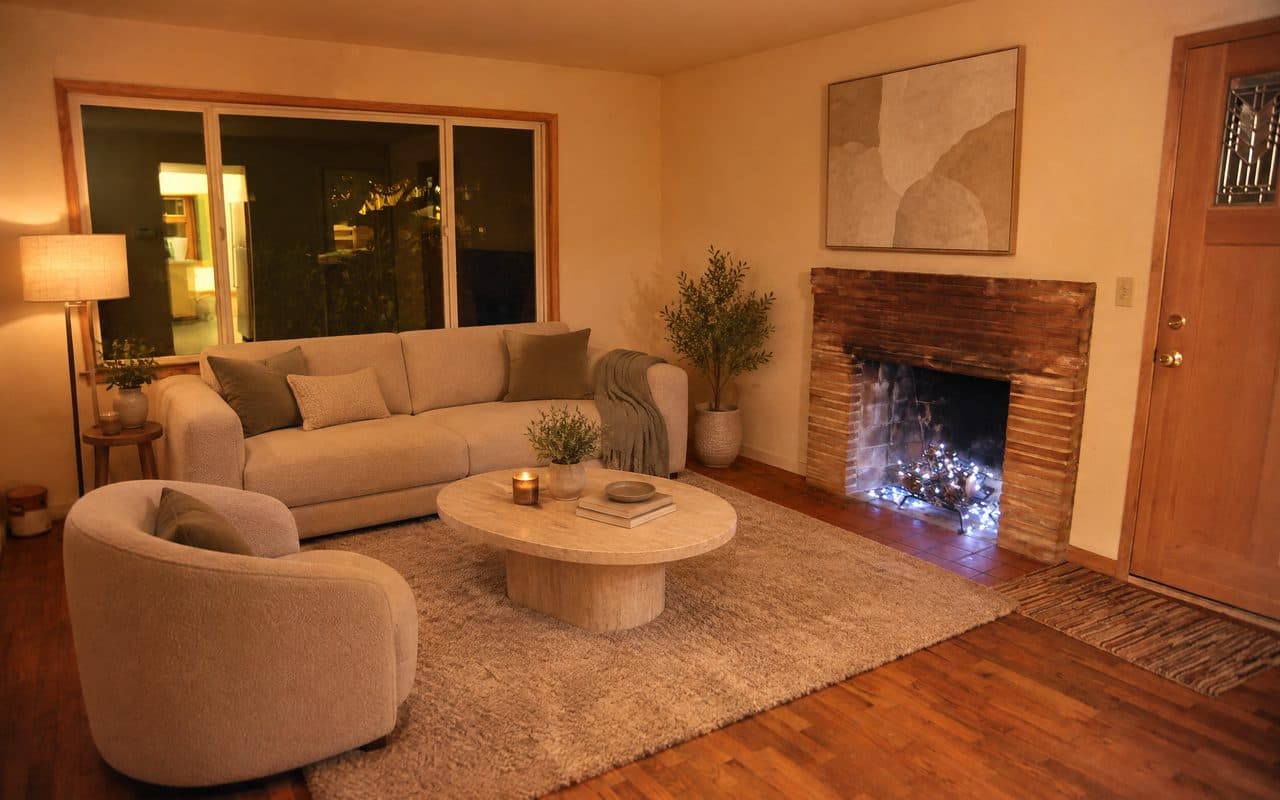 AI-staged, Miravely
Where the AI staging tools put the furniture
Placement went wrong more often than structure. In the living room, Nano Banana 2 put an armchair and a floor lamp in front of the fireplace and Nano Banana Pro ran a sofa across it. Seedream stood a sideboard and a framed picture in the dining room’s bay window, GPT Image 2.5 set a floor lamp against the living-room window and Miravely’s sofa rises over its bottom edge.
These are the faults photographers pick out first. Asked whether a virtually staged living room was listing-ready, r/RealEstatePhotography pointed to a sofa pushed against the fireplace and a couch too long for the room. r/RealEstatePhotography, “Would this pass as listing-ready virtual staging?”, September 10, 2026
None of these changes the house, but each shows a layout nobody would live with, and a staged photo is there to show how a room can be used.
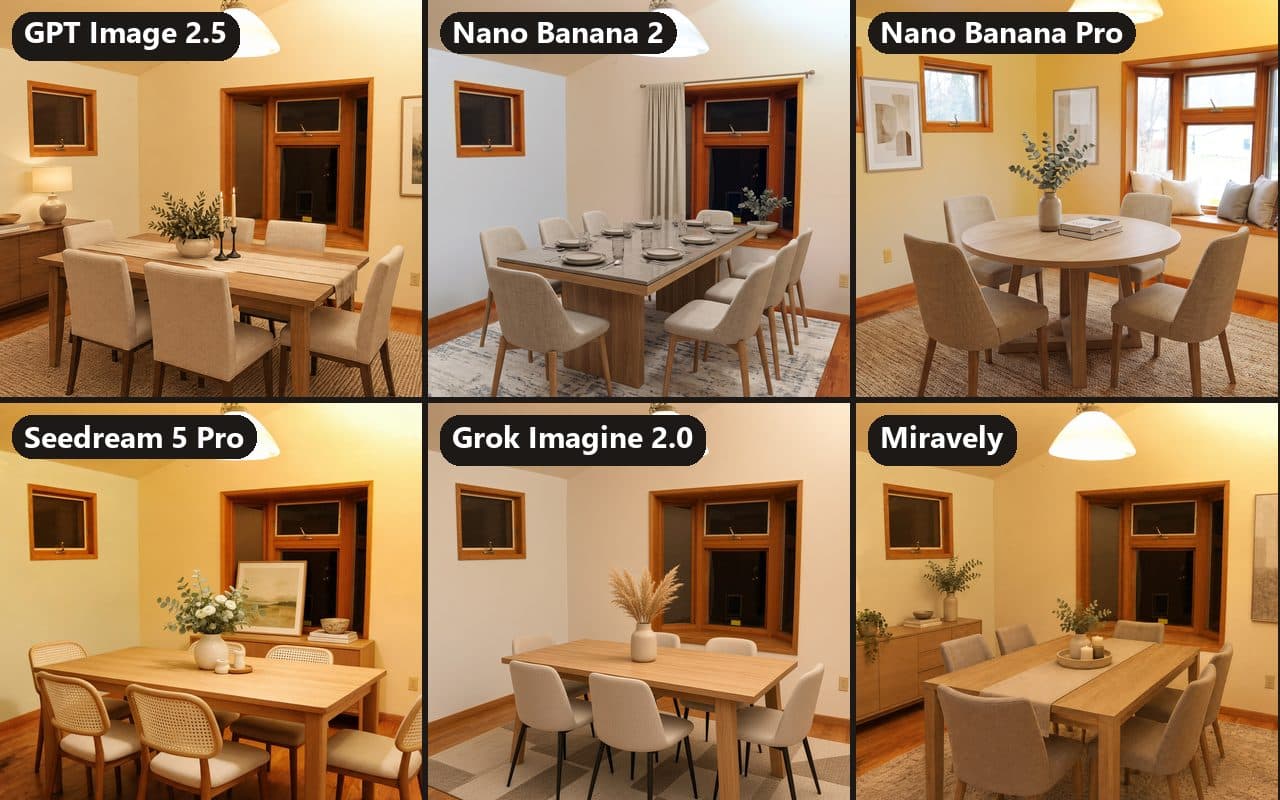 AI-generated
The mistake all six made: the open bedroom door
The bedroom photo has a door standing open into the room. Every tool, Miravely included, put the head of a bed or a bedside table right up against it, so in the real room the door would swing into the furniture.
Miravely’s template tells the model to “keep at least one metre of clear walkway from the door into the room” and not to block “any window, radiator or doorway,” and its result broke the rule anyway. A written rule made no difference here.
A door is the one thing in most rooms whose size a buyer knows without measuring, so furniture against it is the fault most likely to be noticed. Check the swing of every door before a staged photo goes out.
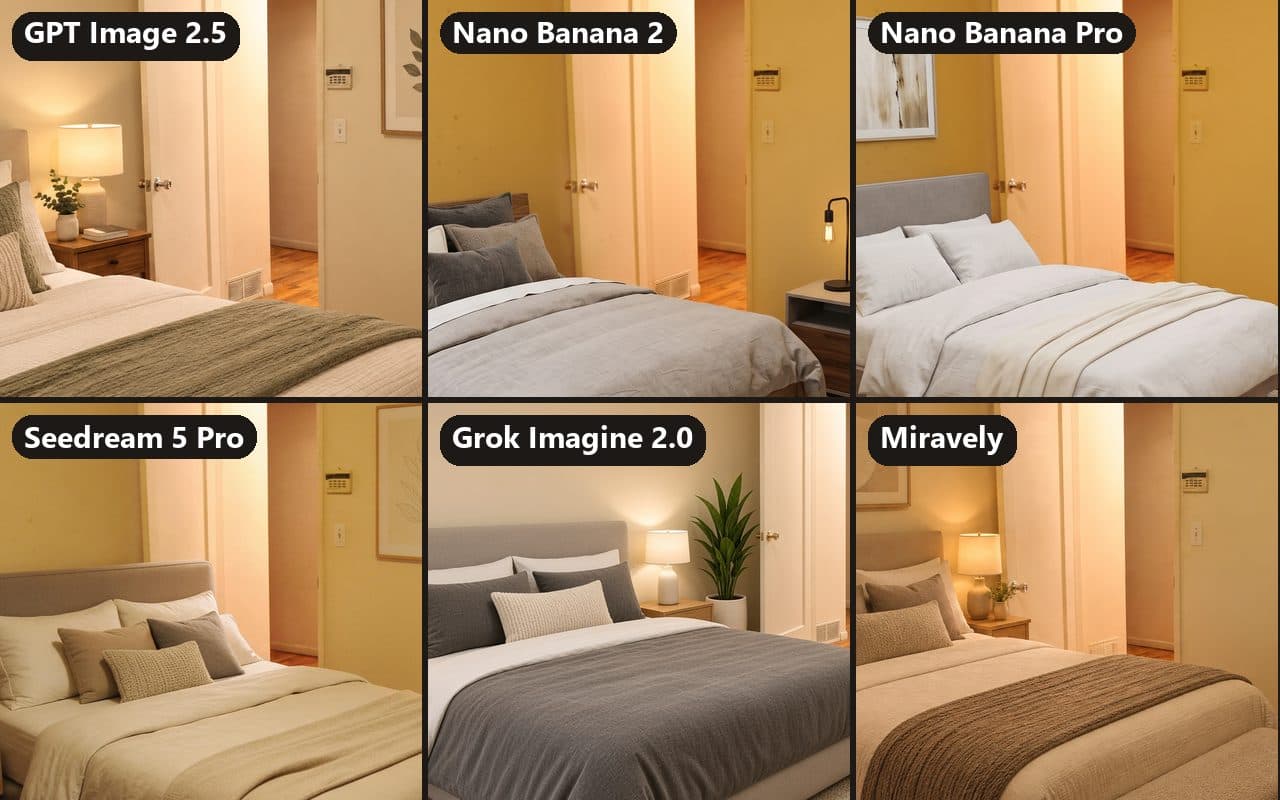 AI-generated
What one AI-staged photo cost, and how long it took
Through the API reseller we ran the test on, one image cost from 2 cents with Grok Imagine 2.0 to 9 cents with Nano Banana Pro: 5 cents for GPT Image 2.5, 6 for Nano Banana 2 and 7 for Seedream 5 Pro. That is what we paid for one result, not the makers’ own prices, and a result that has to be made again costs the same again.
In Miravely, a staged photo at 2K costs 20 credits, about 23 cents on the $29 Starter plan.
Each result took between 41 seconds and 5 minutes 18 seconds from sending to download, and 15 of the 18 arrived in under two and a half minutes. That is the API’s time, queue included; an app can be quicker or slower.
Cheapest result
2 cents
Grok Imagine 2.0, through the API we used, for an image 1,728 pixels wide.
Dearest result
9 cents
Nano Banana Pro at 2K, through the same API.
Slowest result
5 min 18 s
GPT Image 2.5 in the living room. The fastest, Nano Banana 2 in the bedroom, took 41 seconds.
Can ChatGPT or Gemini do virtual staging?
Both take an uploaded photo and an instruction, so either can be asked to stage a room. ChatGPT’s image tool has run Images 2.5 since September 8, 2026, which OpenAI says “is better at preserving the subjects in your reference photos.” OpenAI offers developers two versions of the model, Flare and Sunburst; we tested Sunburst, and OpenAI does not say which of the two ChatGPT matches. OpenAI, “Introducing ChatGPT Images 2.5”, September 8, 2026
In the Gemini app, Nano Banana 2 replaced Nano Banana Pro as the image model in February 2026, across its Fast, Thinking and Pro models. In our test it kept the structure of every room. Google Workspace Updates, “Introducing Nano Banana 2 in the Gemini app”, February 26, 2026
We did not test the apps themselves. An app can resize a photo, add instructions of its own or use a different version of a model, so the same prompt can come back differently there. What carries over is the check: whatever made the image, compare it with the empty photo before it goes anywhere.
The rules apply whichever tool made it. Since January 1, 2026, California has required a statement on or next to each altered listing photo and a link to the unaltered original. AB 723 bill text, California Legislature
Before you publish an AI-staged photo
- Put the staged photo next to the empty one and check that every window, door, outlet and light fitting is where it was.
- Check the frame. If the room looks bigger or the corners have moved, the tool moved the camera.
- Look for anything added to the room itself, such as a mantel shelf, a curtain rod, ceiling lights or a window seat.
- Compare the light and the view. A window that was dark in the photo should not come back full of daylight.
- Keep furniture clear of doors, windows and fireplaces, and make sure every door could still swing. r/RealEstatePhotography, “Would this pass as listing-ready virtual staging?”, September 10, 2026
- Do not rely on a tool’s promise to keep the room. In this test even a template written to keep doors clear put furniture against one.
- Label the staged photo and publish the empty original with it. In California a link to the original is the law. AB 723 bill text, California Legislature
Common questions
What is the best AI for virtual staging?
In our test of six tools on three empty rooms, Nano Banana 2 and Miravely were the only two that kept every window, door and fireplace in place, and none of the six kept furniture away from an open door. One attempt per room is a small sample, so check every result whichever tool you use.
Can ChatGPT do virtual staging?
It can add furniture to an uploaded photo. We tested GPT Image 2.5, the model behind ChatGPT Images 2.5, through an API: it kept the dining room and the bedroom but added a mantel shelf to a living-room fireplace it had been told to leave alone.
OpenAI, “Introducing ChatGPT Images 2.5”, September 8, 2026Can Gemini do virtual staging?
Yes. The Gemini app’s image model has been Nano Banana 2 since February 2026, and in our test it kept the windows, doors and fireplace of all three rooms in place, though it added a curtain over a bay window and put an armchair in front of a fireplace.
Google Workspace Updates, “Introducing Nano Banana 2 in the Gemini app”, February 26, 2026Does AI virtual staging change the room?
It can, even when told not to. Four of the six tools we tested changed a fixed part of at least one room: a new mantel shelf, a rebuilt bay window, a different living room, and a camera pulled back so the bedroom looked bigger.
How can you tell if a virtually staged photo changed the room?
Put it next to the empty photo and check the fixed things one by one: each window and door, the outlets and switches, the light fittings, the fireplace and the corners of the frame. Then check that no piece of furniture stands against a door or in front of a window or fireplace.
How much does AI virtual staging cost per photo?
The images in our test cost us 2 to 9 cents each through an API reseller, which is not what the apps or the makers charge. Staging tools sold by subscription charge more per photo: Virtual Staging AI’s yearly plans work out at $0.53 to $2.67 a photo.
Virtual Staging AI pricingIs AI virtual staging legal?
Yes, as long as it does not misrepresent the property. In California, since January 1, 2026, every altered listing photo needs a statement on or next to it and a link to the unaltered original.
AB 723 bill text, California LegislatureWhy does an AI-staged room look bigger?
Sometimes because the tool moved the camera. In our test Grok Imagine 2.0 pulled back in the bedroom, so its picture takes in more of the room than the photo did, with floor, wall and ceiling drawn in around the edges, and a wider view makes a room look larger than it is.
Miravely’s virtual staging, the sixth tool here, runs the same model as the first with a template written to keep the room as photographed, and keeps the empty original beside every result.